Controls for Web Videos Using Bookmarklet
Few years ago I had an urge to watch all the videos with higher speed to save the time. However not all the web players do have controls to speed up or slow down the video. No need to worry, there is a remedy! The simplest solution I found was usage of bookmarklets: bookmark in your browser that has the URL filled with a piece of javascript code. With the right code you can manipulate the <video>s present in the web page.
TL;DR
TIME is everything, so just add the following bookmarks and be more productive tonight!
First of all make sure your bookmark bar is visible. If not press Ctrl + Shift + B which toggles bar visibility in Chrome and Firefox.
Now perform right click on the bookmark bar and select Add page... or New Bookmark... respectively.
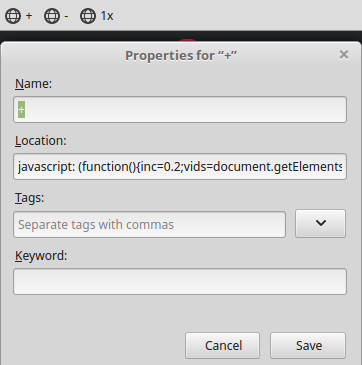
Fill desired functionalities listed below and you are all set!
Pro Tip: grab the link in the Name column and drop it to your bookmark bar to install it.
| action | Name | Location |
|---|---|---|
| speed up by 0.2x | + | javascript: (function(){inc=0.2;vids=document.getElementsByTagName("video");for(key in vids){vids[key].defaultPlaybackRate+=inc;vids[key].playbackRate+=inc;};allframes=document.getElementsByTagName("iframe");for(frm in allframes){curFrm=allframes[frm].contentDocument;if(curFrm != null && curFrm != undefined){frmVids=curFrm.getElementsByTagName("video");for(key in frmVids){frmVids[key].defaultPlaybackRate+=inc;frmVids[key].playbackRate+=inc;}}}})() |
| slow down by 0.2x | - | javascript: (function(){dec=0.2;vids=document.getElementsByTagName("video");for(key in vids){vids[key].defaultPlaybackRate-=dec;vids[key].playbackRate-=dec;};allframes=document.getElementsByTagName("iframe");for(frm in allframes){curFrm=allframes[frm].contentDocument;if(curFrm != null && curFrm != undefined){frmVids=curFrm.getElementsByTagName("video");for(key in frmVids){frmVids[key].defaultPlaybackRate-=dec;frmVids[key].playbackRate-=dec;}}}})() |
| restore default speed | 1x | javascript: (function(){speed=1.0;vids=document.getElementsByTagName("video");for(key in vids){vids[key].defaultPlaybackRate=speed;vids[key].playbackRate=speed;};allframes=document.getElementsByTagName("iframe");for(frm in allframes){curFrm=allframes[frm].contentDocument;if(curFrm != null && curFrm != undefined){frmVids=curFrm.getElementsByTagName("video");for(key in frmVids){frmVids[key].defaultPlaybackRate=speed;frmVids[key].playbackRate=speed;}}}})() |
| skip video (ad) | >> | javascript: (function(){vids=document.getElementsByTagName("video");for(key in vids){vids[key].currentTime=vids[key].duration;};allframes=document.getElementsByTagName("iframe");for(frm in allframes){curFrm=allframes[frm].contentDocument;if(curFrm != null && curFrm != undefined){frmVids=curFrm.getElementsByTagName("video");for(key in frmVids){frmVids[key].currentTime=frmVids[key].duration;}}}})() |
| go back 10 seconds | < | javascript: (function(){inc=-10;vids=document.getElementsByTagName("video");for(key in vids){vids[key].currentTime+=inc;};allframes=document.getElementsByTagName("iframe");for(frm in allframes){curFrm=allframes[frm].contentDocument;if(curFrm != null && curFrm != undefined){frmVids=curFrm.getElementsByTagName("video");for(key in frmVids){frmVids[key].currentTime+=inc;}}}})() |
| go forward 10 seconds | > | javascript: (function(){inc=10;vids=document.getElementsByTagName("video");for(key in vids){vids[key].currentTime+=inc;};allframes=document.getElementsByTagName("iframe");for(frm in allframes){curFrm=allframes[frm].contentDocument;if(curFrm != null && curFrm != undefined){frmVids=curFrm.getElementsByTagName("video");for(key in frmVids){frmVids[key].currentTime+=inc;}}}})() |
Scope
These features will work only on the video content that is delivered by the means of HTML tag <video>. As the other ways of delivering motion picture content practically disappeared and were replaced by <video> the use of these bookmarklets became broader. I am aware it is not perfect and it will not work everywhere, but this is opportunity for your improvements. I’ll be looking forward to them in the comments section!
Code explained
Let’s dismantle now one of the bookmarklets:
|
|
|
|
|
Set increment of playback rate. |
|
Find all <video>s. |
|
For each of found videos… |
|
|
|
…increase playback rates. |
|
|
|
|
|
Find all <iframe>s, where other |
| <video>s could be hiding. | |
|
For each frame… |
|
|
|
…get HTML content,… |
|
…filter non-empty ones and… |
|
|
|
…do the same as above. |
|
|
|
|
|
|
|
|
|
|
|
|
|
|
|
All other listed bookmarklets are mere variations of the one explained above. Use JS Beautify to get more readable code.
This is the list of <video> tag properties that we used:
Enjoy!
If you get any ideas to this, let me know!